
SMS Consent
This page documents, for carrier and A2P 10DLC campaign review, exactly how OpenRydr obtains consent before sending automated safety SMS. It shows the opt-in language a rider sees at the moment of consent, including the required disclosures of message type, frequency, opt-out method, and that message and data rates may apply.
The SMS program
OpenRydr is a motorcycle navigation and ride-safety app. A core feature is crash detection: when a rider enables it and the app detects a likely crash that the rider does not cancel, OpenRydr sends an automated text message to the rider's designated emergency contacts containing a short alert and the rider's last-known location. A rider can also send a test alert to a contact so they know what to expect. If a crash alert goes out and the rider then confirms they are OK, OpenRydr sends one follow-up all-clear telling the contacts it was a false alarm.
- Message type: automated, transactional safety alerts (crash alerts, a follow-up all-clear when a crash alert was a false alarm, and test alerts), tied to a safety event and sent to the rider's own emergency contacts.
- Not marketing: OpenRydr never sends promotional or marketing SMS to safety contacts, and never sells or shares their numbers. The numbers are used only to deliver these safety messages.
How consent is collected
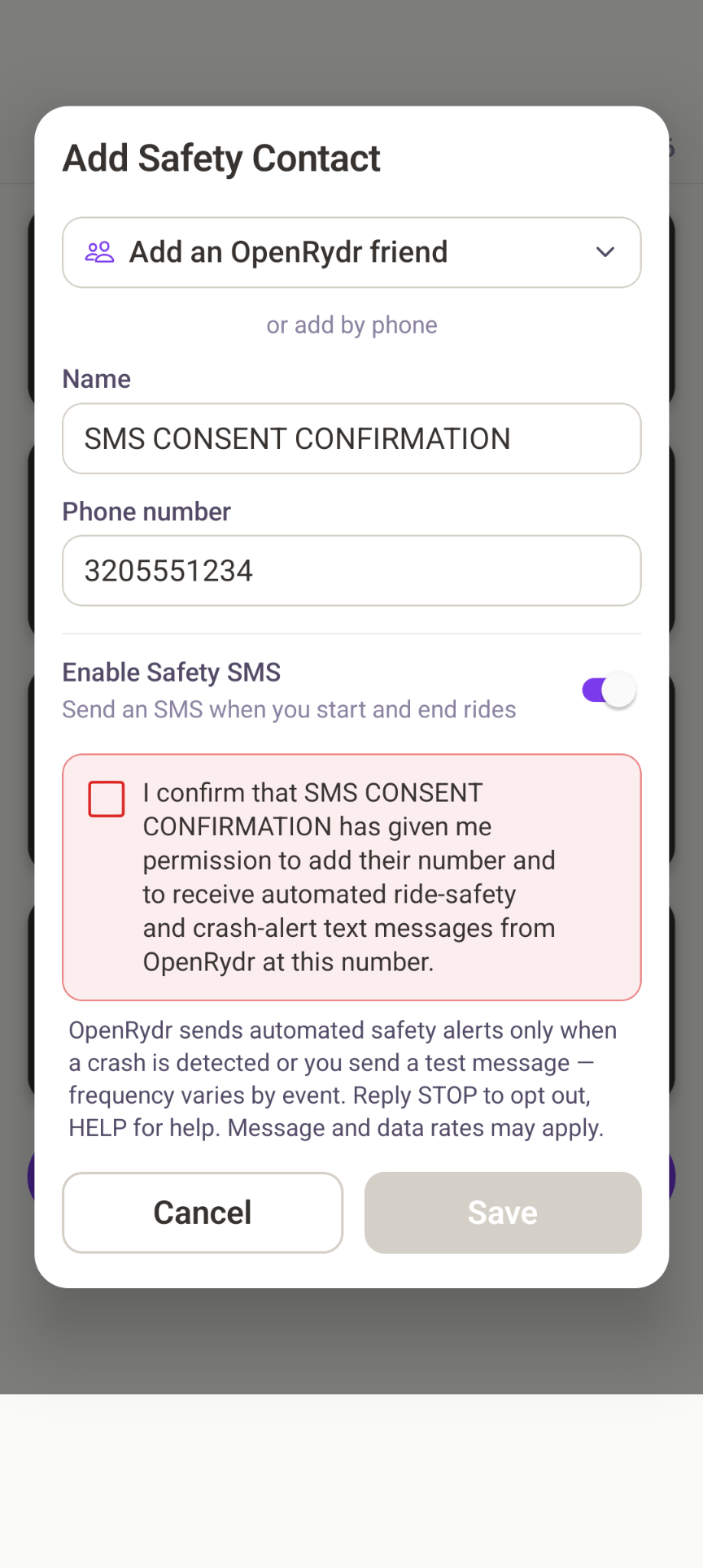
Consent is collected per contact, inside the app, on the Add Safety Contact screen. When a rider adds an emergency contact with a phone number, the contact cannot be saved until the rider checks a mandatory attestation. A CTIA disclosure is displayed directly beneath the checkbox, at the moment of consent — not only in the Terms.
Who consents: the OpenRydr account holder (the rider) attests, on the contact's behalf, that they have obtained that contact's permission. The emergency contact does not register or opt in directly — the rider is responsible for having their permission (see the Terms of Service, Section 6). This is a third-party-consent model appropriate to a personal-safety feature, where the person receiving the alert is the rider's own chosen emergency contact.
The exact wording shown in the app:
Required checkbox — gates Save
“I confirm that [Name] has given me permission to add their number and to receive automated ride-safety and crash-alert text messages from OpenRydr at this number.”
Disclosure — shown directly beneath the checkbox
“OpenRydr sends automated safety alerts only when a crash is detected or you send a test message — frequency varies by event. Reply STOP to opt out, HELP for help. Message and data rates may apply.”
“[Name]” is replaced in-app with the contact's name. When the rider checks the box and saves, OpenRydr records the confirmation on the contact record — a timestamp and the version of the consent text shown — so we can demonstrate which disclosure each contact was consented under.
The consent screen
The Add Safety Contact screen, showing the checkbox and the disclosure beneath it:
The four required disclosures, at a glance
Each CTIA-required element and where it appears in the opt-in above:
| Required element | How the opt-in satisfies it |
|---|---|
| Message type | “automated safety alerts”: crash alerts, a follow-up all-clear after a false alarm, and test alerts (transactional safety only). |
| Frequency | “only when a crash is detected or you send a test message — frequency varies by event” (event-based; not scheduled or recurring). An all-clear is sent only after a crash alert. |
| Opt-out | “Reply STOP to opt out, HELP for help.” |
| Rates | “Message and data rates may apply.” |
Sample messages
The exact text of the transactional safety messages OpenRydr sends to a consented contact (“[Name]” and “[link]” are filled in when the message is sent):
Crash alert
OpenRydr Safety Alert: a possible crash was detected for [Name]. Last known location: [link]. Automated alert - if this is an emergency, call emergency services. Reply STOP to opt out.
Test alert
OpenRydr: [Name] added you as an emergency contact to receive crash alerts. This is a test - no action needed. Reply STOP to opt out, HELP for help. Msg&data rates may apply.
False-alarm all-clear (sent only after a crash alert)
OpenRydr: false alarm - [Name] is OK. The earlier crash alert was not a real emergency. No action needed. Reply STOP to opt out.
Every message identifies OpenRydr and includes the STOP opt-out. A contact who replies STOP stops receiving all OpenRydr safety messages, including crash alerts.
Related policies
- Terms of Service — Section 6 “Authorization to add safety contacts” and Section 7 “Text messages (SMS)”.
- Privacy Policy — how safety-contact information and the consent record are handled.